
Delta Force Mobile: My Global Debut and How to Get in on the Action in 2026
Discover the thrilling world of Delta Force Mobile, the ultimate cross-platform FPS battle royale game. Master seamless cross-progression across devices and dominate the stunning, futuristic battlefields with ease.
Well, well, well, look who finally decided to grace our devices globally back in April 2025—Delta Force Mobile, or as I like to call it, my new digital obsession. It's been a year since its grand entrance, and I've been grinding the battlefield like a hamster on a caffeine-infused wheel. As a cross-platform and cross-progression title, I can seamlessly switch between my phone, tablet, and PC, keeping my hard-earned progress intact. It's like having a loyal digital shadow that follows me everywhere, except this shadow shoots back. Just a heads-up, though: while your progress syncs, you won't be pitting your skills against players on other platforms—it's not cross-play, so you're stuck with your own platform's crowd, which is fine by me since I've got enough competition to deal with!
Now, let's talk about the elephant in the room: the console version. As of 2026, it's still as elusive as a unicorn in a city park. PlayStation and Xbox players are left twiddling their thumbs, waiting for their turn to join the fray. I guess good things come to those who wait, but honestly, it feels like waiting for a snail to finish a marathon.
Getting into the game is easier than convincing a cat to take a bath—here’s my step-by-step guide to installation, updated for 2026:
For Android Users:
-
Step 1: Hop onto the Google Play Store, search for "Delta Force Mobile," find the official title (it should be prominently displayed by now), and tap that glorious Install button.
-
Step 2: Grab a snack and wait for the installation to complete—it’s faster than a cheetah on roller skates.
-
Step 3: Open the app, download the in-game data, and you're ready to roll!
For iOS Enthusiasts:
-
Step 1: Visit the App Store, search for the game, and hit Get. It’s as simple as pie, or should I say, as easy as stealing candy from a baby (but don’t do that).
-
Step 2: Wait patiently—or impatiently, I won’t judge—for the installation to finish.
-
Step 3: Launch the game, install the additional data, and dive into the action!
For PC Masters:
-
Step 1: Head over to Google Play Games and install it if you haven’t already. It’s like the backstage pass to the gaming world.
-
Step 2: Sign in with your Google account, search for Delta Force Mobile, and prepare for glory.
-
Step 3: Click Install and wait. This part is slower than a sloth on a lazy Sunday, but trust me, it’s worth it.
Delta Force Mobile isn't just another FPS battle royale; it's a visual feast wrapped in futuristic tech, with gameplay mechanics that hook you faster than a fisherman reeling in a big catch. The graphics are so stunning, they make my old games look like cave paintings. As of 2026, it boasts three core modes that keep me coming back for more:
-
Black Hawk Down: A campaign mode that’s still MIA on mobile—talk about a cliffhanger!
-
Tactical Turmoil: An extraction looter-shooter mode where every match feels like a high-stakes heist.
-
Havoc Warfare: An attacker-defender mode that’s more intense than a staring contest with a grizzly bear.
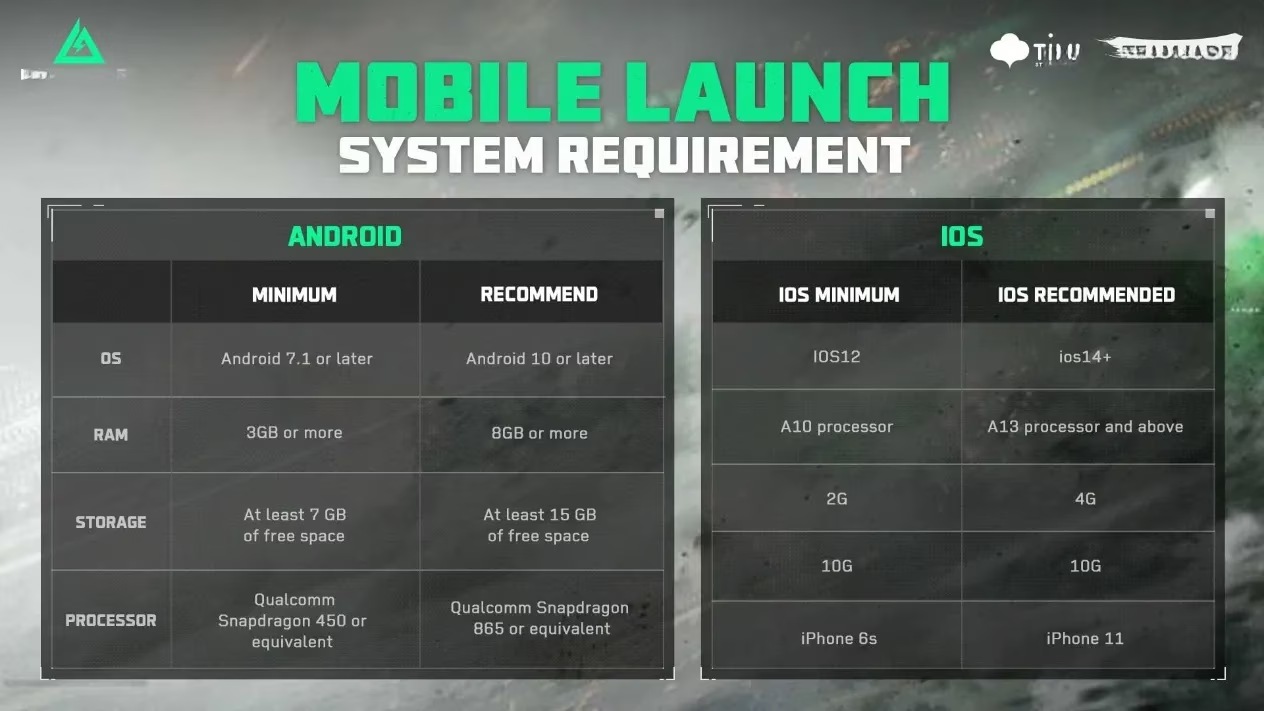
Before you jump in, make sure your device can handle the heat. Here are the minimum system requirements for 2026, updated for optimal performance:
| Platform | OS | RAM | Storage | Processor | Other Notes |
|---|---|---|---|---|---|
| Android | Android 7.1 or later | 3GB+ | 7GB+ free space | Qualcomm Snapdragon 450 or equivalent | - |
| iOS | iOS 12 | - | 10GB+ | A10 processor | iPhone 6s or later, 2G network |
| PC | Windows 10 64-bit | 12GB RAM | 50GB free space | Intel Core i3-4150 / AMD FX-6300 | Graphics: Nvidia GTX 960 / AMD R9 380 / Intel Arc A380, DirectX 12, broadband internet |
If your specs match up, you're in for a treat. Delta Force Mobile is free-to-play, so there's no excuse not to give it a shot—unless your device is older than my grandma's flip phone. Speaking of which, the servers are live and kicking across all regions, so you can join the chaos anytime. As a seasoned player, here are my top 5 beginner tips for 2026:
-
Master the Gadgets: The futuristic tools are your best friends; use them like a wizard with a new spellbook.
-
Stick with Your Squad: Teamwork makes the dream work, especially in extraction modes.
-
Learn the Maps: Knowing the terrain is more crucial than knowing your own birthday.
-
Manage Your Resources: Ammo and health packs are scarcer than honest politicians—use them wisely.
-
Stay Updated: The game evolves faster than a chameleon in a rainbow; keep an eye on patches and meta changes.
In summary, Delta Force Mobile has been my go-to game for over a year now, and it's only gotten better with time. Whether you're on Android, iOS, or PC, the installation is a breeze, and the gameplay is as engaging as a thriller novel. So, what are you waiting for? Install it, jump into the fray, and maybe I'll see you on the battlefield—just don't shoot me, okay? 😉
Well, well, well, look who finally decided to grace our devices globally back in April 2025—Delta Force Mobile, or as I like to call it, my new digital obsession. It's been a year since its grand entrance, and I've been grinding the battlefield like a hamster on a caffeine-infused wheel. As a cross-platform and cross-progression title, I can seamlessly switch between my phone, tablet, and PC, keeping my hard-earned progress intact. It's like having a loyal digital shadow that follows me everywhere, except this shadow shoots back. Just a heads-up, though: while your progress syncs, you won't be pitting your skills against players on other platforms—it's not cross-play, so you're stuck with your own platform's crowd, which is fine by me since I've got enough competition to deal with!
Now, let's talk about the elephant in the room: the console version. As of 2026, it's still as elusive as a unicorn in a city park. PlayStation and Xbox players are left twiddling their thumbs, waiting for their turn to join the fray. I guess good things come to those who wait, but honestly, it feels like waiting for a snail to finish a marathon.
Getting into the game is easier than convincing a cat to take a bath—here’s my step-by-step guide to installation, updated for 2026:
For Android Users:
-
Step 1: Hop onto the Google Play Store, search for "Delta Force Mobile," find the official title (it should be prominently displayed by now), and tap that glorious Install button.
-
Step 2: Grab a snack and wait for the installation to complete—it’s faster than a cheetah on roller skates.
-
Step 3: Open the app, download the in-game data, and you're ready to roll!
For iOS Enthusiasts:
-
Step 1: Visit the App Store, search for the game, and hit Get. It’s as simple as pie, or should I say, as easy as stealing candy from a baby (but don’t do that).
-
Step 2: Wait patiently—or impatiently, I won’t judge—for the installation to finish.
-
Step 3: Launch the game, install the additional data, and dive into the action!
For PC Masters:
-
Step 1: Head over to Google Play Games and install it if you haven’t already. It’s like the backstage pass to the gaming world.
-
Step 2: Sign in with your Google account, search for Delta Force Mobile, and prepare for glory.
-
Step 3: Click Install and wait. This part is slower than a sloth on a lazy Sunday, but trust me, it’s worth it.
Delta Force Mobile isn't just another FPS battle royale; it's a visual feast wrapped in futuristic tech, with gameplay mechanics that hook you faster than a fisherman reeling in a big catch. The graphics are so stunning, they make my old games look like cave paintings. As of 2026, it boasts three core modes that keep me coming back for more:
-
Black Hawk Down: A campaign mode that’s still MIA on mobile—talk about a cliffhanger!
-
Tactical Turmoil: An extraction looter-shooter mode where every match feels like a high-stakes heist.
-
Havoc Warfare: An attacker-defender mode that’s more intense than a staring contest with a grizzly bear.
Before you jump in, make sure your device can handle the heat. Here are the minimum system requirements for 2026, updated for optimal performance:
| Platform | OS | RAM | Storage | Processor | Other Notes |
|---|---|---|---|---|---|
| Android | Android 7.1 or later | 3GB+ | 7GB+ free space | Qualcomm Snapdragon 450 or equivalent | - |
| iOS | iOS 12 | - | 10GB+ | A10 processor | iPhone 6s or later, 2G network |
| PC | Windows 10 64-bit | 12GB RAM | 50GB free space | Intel Core i3-4150 / AMD FX-6300 | Graphics: Nvidia GTX 960 / AMD R9 380 / Intel Arc A380, DirectX 12, broadband internet |
If your specs match up, you're in for a treat. Delta Force Mobile is free-to-play, so there's no excuse not to give it a shot—unless your device is older than my grandma's flip phone. Speaking of which, the servers are live and kicking across all regions, so you can join the chaos anytime. As a seasoned player, here are my top 5 beginner tips for 2026:
-
Master the Gadgets: The futuristic tools are your best friends; use them like a wizard with a new spellbook.
-
Stick with Your Squad: Teamwork makes the dream work, especially in extraction modes.
-
Learn the Maps: Knowing the terrain is more crucial than knowing your own birthday.
-
Manage Your Resources: Ammo and health packs are scarcer than honest politicians—use them wisely.
-
Stay Updated: The game evolves faster than a chameleon in a rainbow; keep an eye on patches and meta changes.
In summary, Delta Force Mobile has been my go-to game for over a year now, and it's only gotten better with time. Whether you're on Android, iOS, or PC, the installation is a breeze, and the gameplay is as engaging as a thriller novel. So, what are you waiting for? Install it, jump into the fray, and maybe I'll see you on the battlefield—just don't shoot me, okay? 😉