
Mastering the Artillery Call-In in Delta Force: A 2026 Guide to Devastating Firepower
Call in devastating Delta Force artillery barrages in Havoc Warfare by accumulating 8,000 squad points as squad leader to obliterate dug-in enemies.
In the chaotic battlefields of Delta Force’s Havoc Warfare, turning the tide often comes down to a single, well-placed high-explosive decision. What if you could erase a dug-in enemy squad, clear an entire capture point, or force a retreat with just a few taps on your tactical tablet? That’s precisely the power the Artillery barrage offers—but only to those who know how to wield it. Despite being one of the most game-changing support tools in the multiplayer suite, many soldiers still fumble with the call-in mechanics or waste the opportunity entirely. Since the game’s significant updates through 2025 and into early 2026, understanding the Artillery system has become even more critical with tweaked scoring rates and new objective-focused modes. This guide breaks down everything you need to know about calling in explosive rain, from point thresholds to strategic genius.
What Exactly Is the Artillery Barrage?
Artillery in Delta Force isn’t just a killstreak—it’s a squad-level fire support ability that rains destruction over a marked area on the map. Think of it as an on-demand mortar storm, capable of dealing massive AoE (Area of Effect) damage. Unlike personal scorestreaks tied to your operator’s gadget slot, this barrage is exclusively available to the squad leader. It costs a whopping 8,000 points accumulated by the entire squad, meaning individual heroics aren’t enough; the whole unit must contribute. Once activated, the barrage blankets the designated location with a series of devastating explosions, obliterating any enemy too slow to evacuate and heavily damaging vehicles caught in the blast zone.
Why 8,000 points? The developers at TiMi Studios Group designed this threshold to prevent spam while rewarding coordinated team play. In 2026, after several balancing passes, the Artillery remains one of the most efficient ways to crack open stubborn defensive lines. Whether you’re attacking on Ascension or defending on Crack, a perfectly timed barrage can be the difference between a soul-crushing defeat and a glorious victory.
Step-by-Step: How to Call in Artillery
The process might seem intimidating at first, but once you’ve done it a couple of times, it becomes muscle memory. Here’s the definitive sequence for unleashing hell on your opponents:
-
Enter Havoc Warfare mode. Artillery is only available in this large-scale combined-arms mode; you won’t find it in other playlists.
-
Ensure you are the Squad Leader. Not just any member—the person with the star next to their name. If you’re not the leader, you can request the role or simply join a different squad where the leader is active. Remember: regardless of operator class (Assault, Support, Recon, Engineer), the squad leader retains exclusive access to the artillery tablet.
-
Rack up squad points. Every kill, assist, revive, capture, and objective play contributes to the squad’s shared pool. Communicate with your teammates—encourage medics to revive, engineers to destroy vehicles, and everyone to play the objective. Solo kills are fine, but squad-wide contributions build the total faster.
-
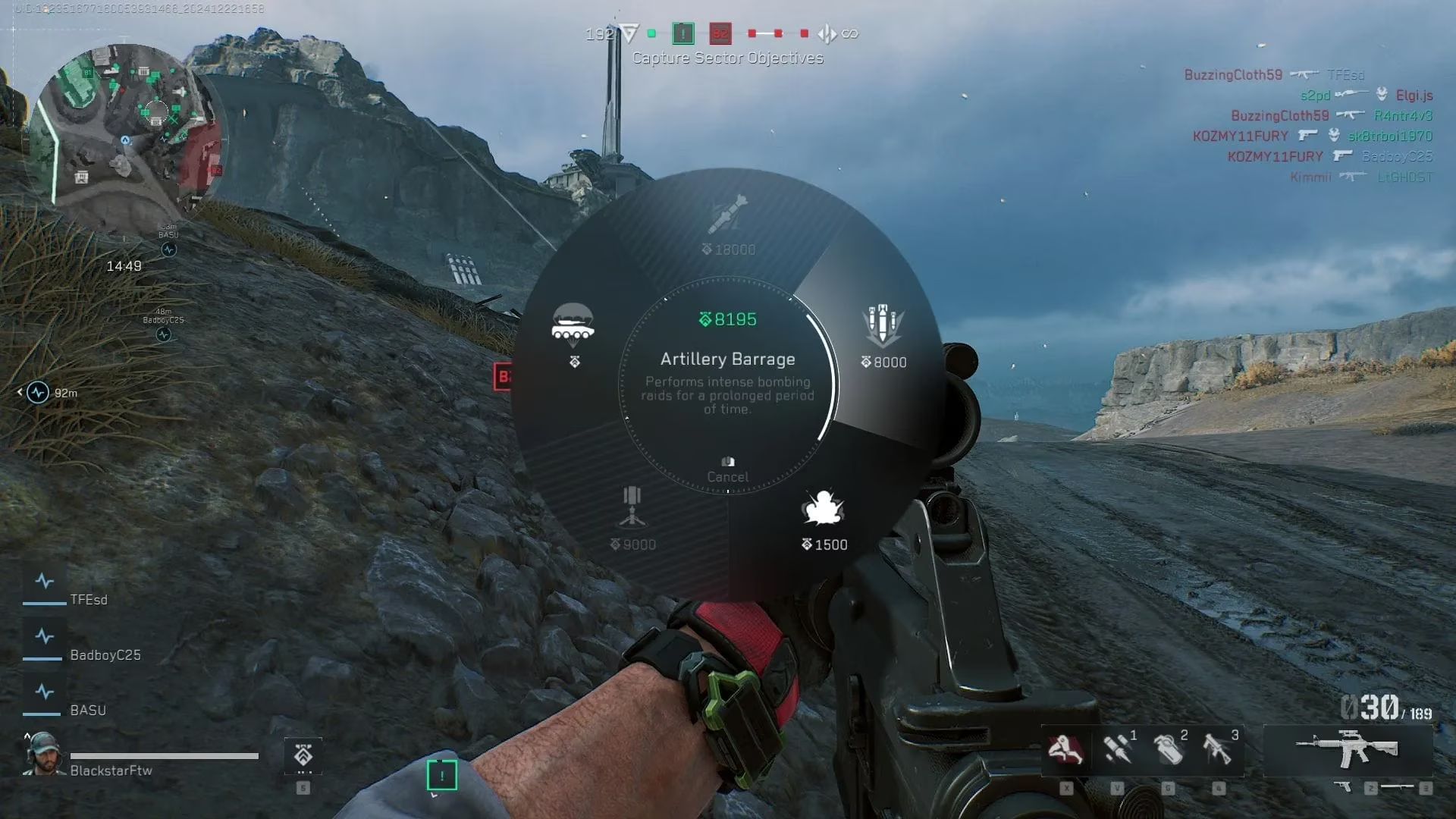
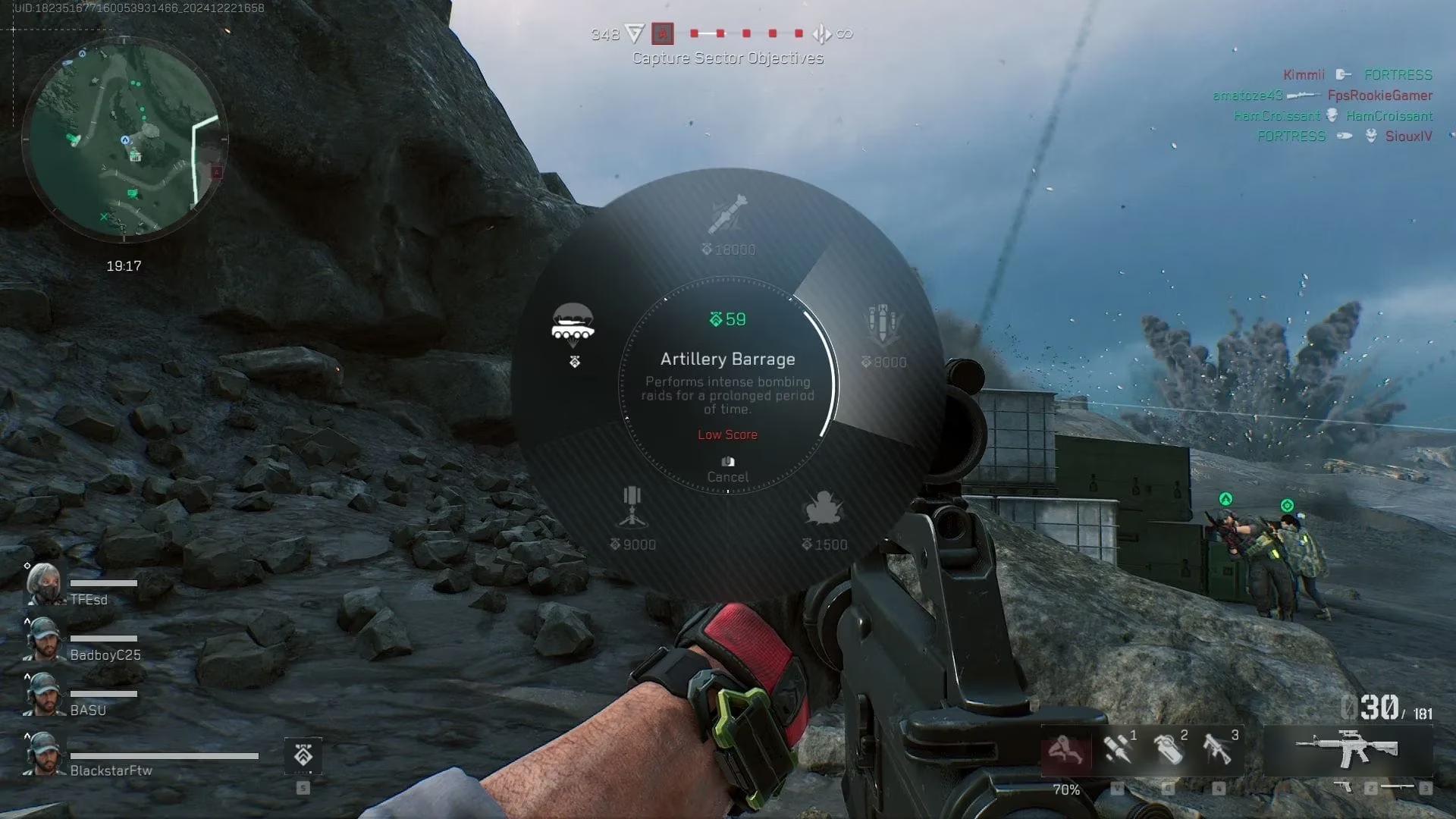
Check your squad’s point total. On PC, press and hold the 5 key (default binding). A radial menu appears, showing your current squad points and available support options. If the counter hasn’t hit 8,000 yet, the Artillery option will be greyed out.
-
Select “Artillery Barrage.” Once the option lights up, click it. Your screen transitions to a tactical tablet view overlaying a live map of the battlefield.
-
Mark the target area. Use your mouse/cursor to pinpoint the location. You’ll see a circular AoE indicator—place it precisely where you expect enemy clusters. Confirm the mark, and the barrage begins after a short delay.
-
Wait for the fireworks. The bombs fall in waves, saturating the circle. Stay in cover and watch your minimap for hit markers; a handful of eliminations isn’t uncommon.
Important Prerequisite Reminders
-
You must be the squad leader. No exceptions. If your leader isn’t using the barrage, politely ask them or switch squads.
-
The 8,000 points are a squad pool, not individual. Don’t mistakenly think you need 8,000 per player.
-
The barrage has a notable cooldown after use. While the exact duration fluctuates with game balance patches (as of the Season 3 update early this year, it’s approximately 3 minutes), you won’t be able to immediately call another one.
Strategic Genius: When and Where to Drop the Hammer
Okay, so you know how to call it. But the real question is: when does an Artillery barrage turn a losing fight into a highlight reel? Too many squad leaders squander their hard-earned points by bombing empty rooftops or dropping it too early. Let’s fix that.
1. Wipe Out Entrenched Defenders
Is there a building on the C flag that’s become a fortress? Enemies camping corners with shotguns and LMGs? Instead of feeding them kills, mark the entire structure. The barrage’s AoE penetrates through floors and walls in most map zones, flushing out or eliminating anyone inside. This is especially effective on maps like Trench or Zero Dam, where verticality and tight halls create natural killboxes.
2. Pre-Objective Clearing
Before your squad rushes a capture point, call the artillery right on top of it. The barrage will either kill defenders outright or force them to scatter, leaving the objective temporarily undefended. Time your push to arrive just as the last shells fall. This technique works wonders in Breakthrough and Sector Control modes, where capturing zones under heavy fire is otherwise a nightmare.
3. Area Denial for Advancing Enemies
Defending a critical chokepoint? If you spot a large wave of attackers moving through a narrow alley or bridge, drop the barrage slightly ahead of their path. Even if it doesn’t score kills, it creates an impassable wall of explosions, delaying the enemy push and buying precious seconds for your team to respawn and reposition.
4. Vehicle Annihilation
The Artillery’s damage profile is cruel to light vehicles and can strip the armor of MBTs. If an enemy helicopter is hovering low to drop troops, a well-timed barrage can send it spiraling. For tanks, coordinate with your team’s Engineer—barrage the tank’s position, forcing it to move or take massive damage, and then finish it off with rockets.
Common Pitfalls and How to Avoid Them
Even veterans make mistakes. Here’s what to watch out for:
-
Calling it too early. Don’t waste the barrage at the start of a round when enemies are still scattered. Wait for a clear target concentration.
-
Missing the squad leader role. Many players join a squad and never realize they aren’t the leader. Always verify your status in the squad menu.
-
Poor placement. The tablet view doesn’t show real-time enemy positions perfectly—use your map knowledge and squad pings to predict where foes are hunkered down.
-
No communication. Let your squad know you’re about to call the barrage. A simple “bombing B point, push in 5 seconds” in voice or text chat can double its effectiveness.
The Evolving Meta in 2026
Since its release, Delta Force has received numerous updates that indirectly affect Artillery usage. Early 2026 saw a slight increase in squad point gains for revives and objective captures, making it faster to reach 8,000 if your squad plays the objective religiously. Additionally, new maps introduced this year feature more destructible environments—meaning a well-placed barrage can now collapse entire facades, altering sightlines permanently for the remainder of the match. Smart squad leaders study map flow and exploit destructible cover to maximize impact.
One emerging trend is the “double-tap” strategy: pairing an Artillery barrage with a follow-up airstrike from another squad member’s personal scorestreak. With coordination, this can completely saturate an area for nearly 10 seconds, guaranteeing that nothing survives. It requires sharing comms and points, but in coordinated clan matches, it’s becoming the go-to tactic for breaking stalemates.
Final Thoughts: Become Your Squad’s Artillery Ace
The Artillery barrage isn’t just a button you press when you have enough points—it’s a statement. It says, “I see your fortified position, and I choose to remove it.” By mastering the call-in mechanics and honing your game sense for the perfect moment, you’ll elevate your squad from ordinary to overwhelming. Take command, pile up those squad points, and let the artillery sing. In the fast-paced environment of 2026’s Delta Force, those who master fire support will dominate every Havoc Warfare lobby.
As you fine-tune your artillery skills and gear up for the next Delta Force session, it’s worth considering how to expand your gaming library without breaking the bank. Whether you’re looking to explore other tactical shooters or dive into entirely new genres, finding great deals on games is always a plus. With the right resources, you can stay ahead of the curve and keep your collection fresh.
If you’re on the hunt for affordable titles to complement your Delta Force experience, check out PC game discounts. DealNest offers a curated selection of discounted games, making it easier to snag your next favorite title at a fraction of the cost. It’s a great way to keep your gaming sessions diverse and exciting without overspending.
In the chaotic battlefields of Delta Force’s Havoc Warfare, turning the tide often comes down to a single, well-placed high-explosive decision. What if you could erase a dug-in enemy squad, clear an entire capture point, or force a retreat with just a few taps on your tactical tablet? That’s precisely the power the Artillery barrage offers—but only to those who know how to wield it. Despite being one of the most game-changing support tools in the multiplayer suite, many soldiers still fumble with the call-in mechanics or waste the opportunity entirely. Since the game’s significant updates through 2025 and into early 2026, understanding the Artillery system has become even more critical with tweaked scoring rates and new objective-focused modes. This guide breaks down everything you need to know about calling in explosive rain, from point thresholds to strategic genius.
What Exactly Is the Artillery Barrage?
Artillery in Delta Force isn’t just a killstreak—it’s a squad-level fire support ability that rains destruction over a marked area on the map. Think of it as an on-demand mortar storm, capable of dealing massive AoE (Area of Effect) damage. Unlike personal scorestreaks tied to your operator’s gadget slot, this barrage is exclusively available to the squad leader. It costs a whopping 8,000 points accumulated by the entire squad, meaning individual heroics aren’t enough; the whole unit must contribute. Once activated, the barrage blankets the designated location with a series of devastating explosions, obliterating any enemy too slow to evacuate and heavily damaging vehicles caught in the blast zone.
Why 8,000 points? The developers at TiMi Studios Group designed this threshold to prevent spam while rewarding coordinated team play. In 2026, after several balancing passes, the Artillery remains one of the most efficient ways to crack open stubborn defensive lines. Whether you’re attacking on Ascension or defending on Crack, a perfectly timed barrage can be the difference between a soul-crushing defeat and a glorious victory.
Step-by-Step: How to Call in Artillery
The process might seem intimidating at first, but once you’ve done it a couple of times, it becomes muscle memory. Here’s the definitive sequence for unleashing hell on your opponents:
-
Enter Havoc Warfare mode. Artillery is only available in this large-scale combined-arms mode; you won’t find it in other playlists.
-
Ensure you are the Squad Leader. Not just any member—the person with the star next to their name. If you’re not the leader, you can request the role or simply join a different squad where the leader is active. Remember: regardless of operator class (Assault, Support, Recon, Engineer), the squad leader retains exclusive access to the artillery tablet.
-
Rack up squad points. Every kill, assist, revive, capture, and objective play contributes to the squad’s shared pool. Communicate with your teammates—encourage medics to revive, engineers to destroy vehicles, and everyone to play the objective. Solo kills are fine, but squad-wide contributions build the total faster.
-
Check your squad’s point total. On PC, press and hold the 5 key (default binding). A radial menu appears, showing your current squad points and available support options. If the counter hasn’t hit 8,000 yet, the Artillery option will be greyed out.
-
Select “Artillery Barrage.” Once the option lights up, click it. Your screen transitions to a tactical tablet view overlaying a live map of the battlefield.
-
Mark the target area. Use your mouse/cursor to pinpoint the location. You’ll see a circular AoE indicator—place it precisely where you expect enemy clusters. Confirm the mark, and the barrage begins after a short delay.
-
Wait for the fireworks. The bombs fall in waves, saturating the circle. Stay in cover and watch your minimap for hit markers; a handful of eliminations isn’t uncommon.
Important Prerequisite Reminders
-
You must be the squad leader. No exceptions. If your leader isn’t using the barrage, politely ask them or switch squads.
-
The 8,000 points are a squad pool, not individual. Don’t mistakenly think you need 8,000 per player.
-
The barrage has a notable cooldown after use. While the exact duration fluctuates with game balance patches (as of the Season 3 update early this year, it’s approximately 3 minutes), you won’t be able to immediately call another one.
Strategic Genius: When and Where to Drop the Hammer
Okay, so you know how to call it. But the real question is: when does an Artillery barrage turn a losing fight into a highlight reel? Too many squad leaders squander their hard-earned points by bombing empty rooftops or dropping it too early. Let’s fix that.
1. Wipe Out Entrenched Defenders
Is there a building on the C flag that’s become a fortress? Enemies camping corners with shotguns and LMGs? Instead of feeding them kills, mark the entire structure. The barrage’s AoE penetrates through floors and walls in most map zones, flushing out or eliminating anyone inside. This is especially effective on maps like Trench or Zero Dam, where verticality and tight halls create natural killboxes.
2. Pre-Objective Clearing
Before your squad rushes a capture point, call the artillery right on top of it. The barrage will either kill defenders outright or force them to scatter, leaving the objective temporarily undefended. Time your push to arrive just as the last shells fall. This technique works wonders in Breakthrough and Sector Control modes, where capturing zones under heavy fire is otherwise a nightmare.
3. Area Denial for Advancing Enemies
Defending a critical chokepoint? If you spot a large wave of attackers moving through a narrow alley or bridge, drop the barrage slightly ahead of their path. Even if it doesn’t score kills, it creates an impassable wall of explosions, delaying the enemy push and buying precious seconds for your team to respawn and reposition.
4. Vehicle Annihilation
The Artillery’s damage profile is cruel to light vehicles and can strip the armor of MBTs. If an enemy helicopter is hovering low to drop troops, a well-timed barrage can send it spiraling. For tanks, coordinate with your team’s Engineer—barrage the tank’s position, forcing it to move or take massive damage, and then finish it off with rockets.
Common Pitfalls and How to Avoid Them
Even veterans make mistakes. Here’s what to watch out for:
-
Calling it too early. Don’t waste the barrage at the start of a round when enemies are still scattered. Wait for a clear target concentration.
-
Missing the squad leader role. Many players join a squad and never realize they aren’t the leader. Always verify your status in the squad menu.
-
Poor placement. The tablet view doesn’t show real-time enemy positions perfectly—use your map knowledge and squad pings to predict where foes are hunkered down.
-
No communication. Let your squad know you’re about to call the barrage. A simple “bombing B point, push in 5 seconds” in voice or text chat can double its effectiveness.
The Evolving Meta in 2026
Since its release, Delta Force has received numerous updates that indirectly affect Artillery usage. Early 2026 saw a slight increase in squad point gains for revives and objective captures, making it faster to reach 8,000 if your squad plays the objective religiously. Additionally, new maps introduced this year feature more destructible environments—meaning a well-placed barrage can now collapse entire facades, altering sightlines permanently for the remainder of the match. Smart squad leaders study map flow and exploit destructible cover to maximize impact.
One emerging trend is the “double-tap” strategy: pairing an Artillery barrage with a follow-up airstrike from another squad member’s personal scorestreak. With coordination, this can completely saturate an area for nearly 10 seconds, guaranteeing that nothing survives. It requires sharing comms and points, but in coordinated clan matches, it’s becoming the go-to tactic for breaking stalemates.
Final Thoughts: Become Your Squad’s Artillery Ace
The Artillery barrage isn’t just a button you press when you have enough points—it’s a statement. It says, “I see your fortified position, and I choose to remove it.” By mastering the call-in mechanics and honing your game sense for the perfect moment, you’ll elevate your squad from ordinary to overwhelming. Take command, pile up those squad points, and let the artillery sing. In the fast-paced environment of 2026’s Delta Force, those who master fire support will dominate every Havoc Warfare lobby.
As you fine-tune your artillery skills and gear up for the next Delta Force session, it’s worth considering how to expand your gaming library without breaking the bank. Whether you’re looking to explore other tactical shooters or dive into entirely new genres, finding great deals on games is always a plus. With the right resources, you can stay ahead of the curve and keep your collection fresh.
If you’re on the hunt for affordable titles to complement your Delta Force experience, check out PC game discounts. DealNest offers a curated selection of discounted games, making it easier to snag your next favorite title at a fraction of the cost. It’s a great way to keep your gaming sessions diverse and exciting without overspending.